Key takeaways
Ai-powered landscape design apps simplify yard planning by offering instant visualizations and intelligent suggestions.
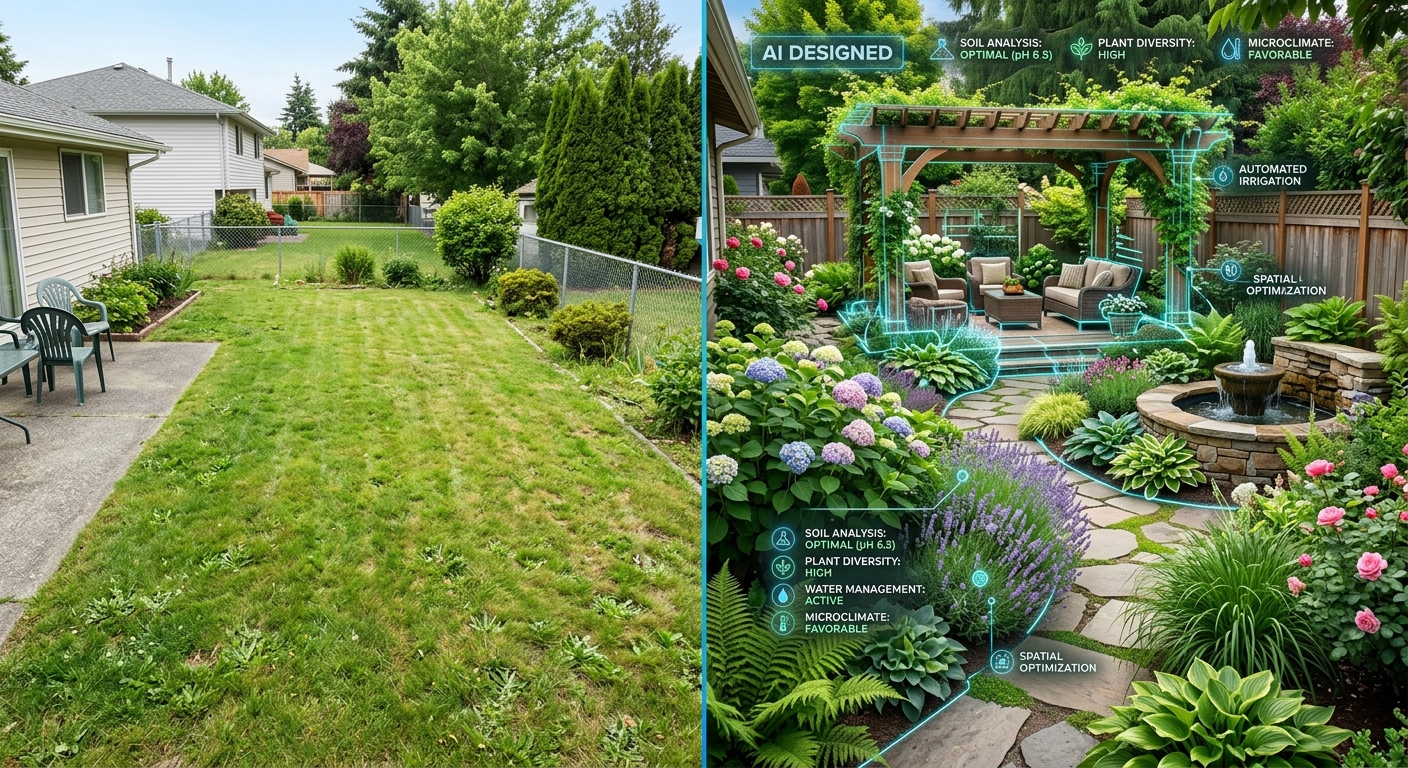
LandscapeAI excels at turning photos of your existing space into realistic design previews, making it ideal for "try-on" transformations.
Tools vary widely in complexity, from drag-and-drop simplicity for homeowners to professional-grade features.
The best app for you depends on your budget, design experience, and specific project needs, whether it's plant selection or 3d modeling.
While AI offers incredible efficiency, understanding its current limitations is key to managing expectations for your diy yard design tool.
The dream of a perfect backyard often feels out of reach, limited by complex design software or the high cost of professional help. Fortunately, homeowners now have access to powerful landscape design apps that leverage AI to simplify visualization and planning. These intelligent tools allow you to upload photos of your existing space and experiment with new layouts, plant species, and hardscape materials, seeing realistic previews before committing to any changes. Explore how apps like LandscapeAI can transform your vision into a tangible plan, making dream gardens a reality.
We included these competitors in our analysis: LandscapeAI, paintit.ai, planner5d, houzz, cedreo, and foyr.
Types of AI used in landscape design
Ai plays several roles in modern landscape design, moving beyond basic cad functionalities to offer more intelligent and intuitive experiences for homeowners.
Generative design: this AI capability allows users to input basic parameters (e.g., lot size, desired style, sunlight exposure), and the AI will generate multiple unique design variations. It's like having a design assistant constantly brainstorming ideas for your outdoor space. For example, the LandscapeAI concept generator can quickly explore different styles for your yard.
Image recognition: many apps use AI to "understand" uploaded photos of your existing yard. It can identify current structures, terrain, and even existing plants, providing a foundation for your design. This makes the "try-on" experience much more accurate.
Predictive modeling: AI can simulate how a design might evolve over time. This includes predicting plant growth, seasonal changes in foliage and bloom, and even how shadows will fall at different times of day, helping you plan for the long term.
Style recommendations: based on your preferences or uploaded images, AI can suggest design elements (plants, pavers, furniture) that fit a specific aesthetic, whether it's a cozy cottage garden or a modern minimalist patio.
Comparison of AI landscape design software

Top AI landscape design tools in 2026
LandscapeAI: ai-driven exterior visualizations
LandscapeAI stands out as a powerful diy yard design tool for homeowners who want to see their landscape ideas come to life on their actual property. By simply uploading a photo of your current yard, the AI engine can generate a variety of design styles, add new elements, and instantly transform your outdoor space. It’s perfect for visualizing major changes before you commit.
Key features: photo-to-design transformation, AI style suggestions, various hardscape and softscape options, realistic rendering.
Best for: homeowners and diy enthusiasts who want to visualize drastic changes to their existing yard without starting from scratch. Excellent for exploring curb appeal updates or a complete backyard overhaul.
Limitations: primarily focused on visual "try-on" rather than detailed, technical construction plans or specific plant care information.
Try it: see how quickly you can redesign your space with LandscapeAI exterior design.
Paintit.ai: ai-driven exterior visualizations
Paintit.ai is a tool that allows homeowners to see their landscape ideas on their property. By uploading a photo, users can generate various design styles and see potential transformations of their outdoor space. It is a useful option for visualizing changes before commitment.
Key features: photo-to-design transformation, AI style suggestions, various hardscape and softscape options.
Best for: homeowners and diy enthusiasts who want to see how different styles might look in their existing yard.
Limitations: like many visual tools, it is more focused on inspiration than technical construction documentation.
Planner5d: intuitive 3d garden planning
Planner5d offers a robust platform for both interior and exterior home design. While not exclusively an AI landscape design tool, its extensive library of outdoor elements and intuitive 3d editor make it a strong contender for homeowners. You can design patios, add pools, arrange furniture, and experiment with various plants within a full 3d environment.
Key features: drag-and-drop interface, large 3d object library (plants, furniture, structures), 2d and 3d views, snapshot rendering.
Best for: users who want to design their entire home environment, including detailed outdoor spaces, with a focus on 3d visualization and space planning.
Limitations: AI features are less emphasized for specific landscape suggestions compared to dedicated AI tools.
Houzz: inspiration and basic design tools
Houzz is well-known as a hub for home design inspiration, connecting homeowners with design professionals and products. While its core strength is not advanced AI design generation, it offers basic virtual design tools that can be helpful for preliminary planning. You can explore a vast photo library for inspiration, save ideas, and even try out products virtually in your space.
Key features: extensive photo database, product marketplace, professional directory, basic "view in my room" ar tool for furniture.
Best for: homeowners seeking inspiration, exploring styles, and sourcing products for their landscape projects. Also useful for finding local landscape professionals.
Limitations: its design tools are more basic for landscape planning; less focus on generative AI for layout or plant suggestions compared to specialized apps.
Cedreo: professional-grade visuals made accessible
Cedreo is primarily a 3d home design software aimed at builders and remodelers, but its powerful outdoor design capabilities make it accessible to homeowners with more ambitious projects. It allows for detailed exterior and landscape planning, offering high-quality 3d renders that can visualize everything from hardscaping to planting layouts.
Key features: detailed 2d and 3d floor plans, extensive material and object libraries (including outdoor elements), realistic 3d rendering for exteriors and landscapes.
Best for: homeowners undertaking significant renovations or new builds who desire professional-level 3d visualizations for their entire property, including the surrounding landscape.
Limitations: can be more complex than basic diy tools and may have a steeper learning curve for casual users.
Foyr: fast ai-powered planning
Foyr offers ai-powered design solutions with a strong emphasis on speed and ease of use, making it appealing for users who want quick, professional-looking visualizations. While it has robust capabilities for interiors, its exterior features also allow for effective landscape planning, leveraging AI to streamline the process from concept to rendering.
Key features: ai-powered floor plan generation, extensive library of 3d models, fast rendering, interior and exterior design capabilities.
Best for: users looking for a rapid design workflow, particularly those who appreciate AI assistance in generating layouts and realistic visualizations for both indoor and outdoor spaces.
Limitations: its landscape-specific AI features might be less specialized than dedicated landscape apps, and its primary focus can lean towards architectural planning rather than gardening details.
Detailed feature comparison

Professional tools for advanced users
While our focus is on accessible landscape design apps for homeowners, it's worth noting that some tools, like cedreo, offer professional-grade capabilities that might appeal to diyers with advanced needs or a willingness to learn. These tools often provide:
High-fidelity rendering: producing photorealistic images that are almost indistinguishable from actual photographs.
Detailed structural planning: ability to plan retaining walls, complex decking, and grading with precision.
Extensive material libraries: access to a wider range of specific pavers, wood types, and stone finishes.
Integration with professional workflows: some can export plans in formats compatible with cad software used by landscape architects.
For most homeowners, however, the simpler, ai-driven tools offer ample functionality without the steep learning curve or higher cost associated with professional-tier software.
Strategic recommendations (decision framework)
Choosing the right landscape design app depends on your specific goals and comfort level:
For quick visual inspiration and "try-on": if you want to see immediate transformations of your existing space with minimal effort, apps like LandscapeAI are ideal. They're excellent for generating ideas and exploring different styles on your own photos.
For comprehensive 3d planning of a new space: if you're starting from scratch or want a detailed 3d model of your entire property (including the house), planner5d or cedreo offer robust environments for building out your vision.
For product sourcing and connecting with pros: if inspiration and finding contractors or specific materials are your main drivers, houzz offers a strong community and marketplace aspect.
For speed and ai-assisted layouts: if you value rapid design iteration and AI suggestions for overall layouts, foyr provides a streamlined experience.
For mobile-first design: if you prefer to design on the go, look for a dedicated gardening app for iphone or android landscaping app that offers a good user experience on smaller screens. Many of the tools listed have strong mobile app versions.
Consider your time commitment, the scale of your project, and whether your priority is aesthetic visualization or detailed technical planning.
The ultimate hybrid workflow (step-by-step)
Gather inspiration & define goals: start by browsing platforms like houzz or pinterest to collect ideas. Think about what you want your yard to achieve – a relaxing oasis, a play area for kids, a vegetable garden.
Capture your existing space: take high-quality photos of your current yard from multiple angles. This will be crucial for tools like LandscapeAI.
Generate initial concepts with ai: upload your photos to an app like LandscapeAI AI landscape design to quickly generate various design styles. Experiment with different elements like patios, pathways, and planting arrangements to see what resonates.
Refine & detail in 3d: once you have a general direction, move to a 3d planning tool like planner5d or cedreo (if your project is complex) to flesh out the details. Accurately place structures, specific plant varieties, and hardscape materials. This is where you can truly act as a diy yard design tool master.
Seek feedback & iterate: share your generated designs with friends or family. Use their feedback to make adjustments in your chosen apps.
Plan implementation: use your final design as a blueprint. Create a list of materials, plants, and estimated costs. For more complex projects, you might use houzz to find local professionals for quotes.
Managing expectations: current AI limitations
While AI has made incredible strides, it’s important for homeowners to approach these tools with realistic expectations:
Hyper-realistic accuracy: while AI rendering is impressive, it may not perfectly replicate every nuance of light, shadow, and specific plant varietal like a seasoned landscape architect would.
Construction details: AI excels at visualization but typically won't provide the precise engineering or structural calculations needed for complex builds (e.g., retaining wall specifications, drainage plans).
Plant-specific knowledge: while apps have plant databases, the AI may not fully account for your local climate, soil conditions, or pest issues in its suggestions. Always cross-reference with local gardening resources.
Budgeting and sourcing: AI can suggest elements, but connecting those suggestions to real-world costs, availability, and lead times for materials often requires manual research.
Permit requirements: no app can advise on local zoning laws, building codes, or permit requirements for your specific project. These must be researched independently.
Faq
Q: Can AI landscape design apps accurately represent my existing garden?
A: most AI apps allow you to upload a photo of your current space, which serves as the base for visualization. The AI then works within those constraints, though precise photographic accuracy can vary depending on the app's rendering capabilities.
Q: How realistic are the 3d models and visualizations?
A: realism varies by app. High-end apps with advanced AI offer very detailed textures, lighting, and plant growth simulations. Basic apps may provide simpler, more conceptual models. Checking reviews for visual quality can be helpful.
Q: Do i need design experience to use these apps?
A: no, these apps are largely designed for homeowners. Many feature intuitive drag-and-drop interfaces and ai-driven suggestions to guide users, even those with no prior design background.
Q: Can these apps help me plan for different seasons?
A: some advanced apps allow you to simulate seasonal changes, showing how plants will look in spring blooms, summer foliage, or winter structure. This feature helps in year-round planning, especially for gardening apps for iphone or an android landscaping app.
Q: Are AI landscape design apps suitable for small yards or balconies?
A: yes, many apps offer tools for various scales, from large estates to small urban gardens and even container planting on balconies. You can often input specific dimensions to tailor the design.
Conclusion
The evolution of AI in landscape design apps has truly opened up possibilities for homeowners. What once required professional expertise or extensive manual planning can now be visualized and refined with intuitive digital tools.
By leveraging these intelligent assistants, you can experiment with ideas, compare styles, and make informed decisions about your outdoor sanctuary, all before breaking ground or spending on materials. Whether you're looking for an android landscaping app or a robust desktop program, the power to create your dream garden is now at your fingertips. Take the first step towards transforming your yard today.